Free Minecraft Seed Map for Java & Bedrock
Looking for a Minecraft seed map? This free interactive mapper lets you visualize your entire Minecraft world before you even spawn in. Enter any seed number to explore biomes, locate villages, strongholds, and 22 structure types across Java Edition and Bedrock Edition — no download or signup required.
Seeing biomes on the map is step one; understanding them is step two. The biome-finding method behind the map explains how biomes are placed and why their borders fall where they do.
Whether you call it a Minecraft seed mapper, a seed to map converter, or a Minecraft seeds map viewer, this tool does it all: paste a seed, pick your version, and watch your world appear. Many players search for a minecraft seed to map tool when starting a new world — paste a seed, pick your version, and watch it appear.
What Is a Minecraft Seed Map?
It is a free online tool that generates a visual, top-down map of your entire Minecraft world using only its seed number. Instead of exploring blindly for hours, you can see every biome, structure, and terrain feature instantly — villages, strongholds, ancient cities, ocean monuments, and more, all pinned to their exact coordinates.
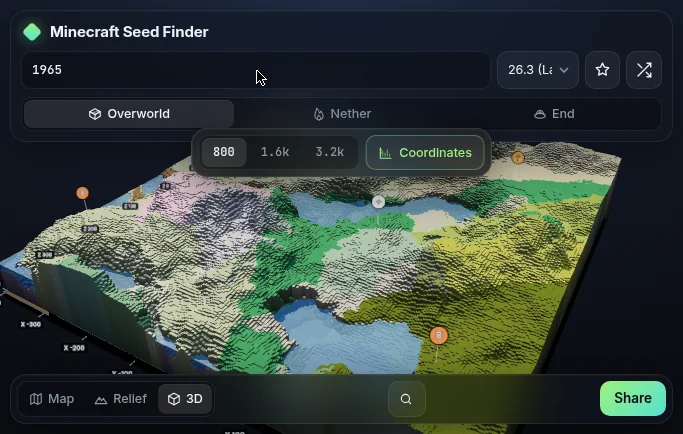
Every Minecraft world is generated from a seed number using a fixed algorithm. A seed map reads that same algorithm and draws the result, so what you see on the map is a faithful preview of what you’ll find in-game.
How to Use the Seed Map Viewer
Using this Minecraft seeds map viewer takes less than 30 seconds: See How to Use Minecraft Seed Map for a full walkthrough, and How to Find Your Minecraft Seed if you don’t know your seed yet.
- Enter your seed — Type any number or text seed into the box at the top-left. Don’t know your seed? On Java, open chat and type
/seed. On Bedrock, check your world settings under the Game tab. - Select your edition and version — Choose Java or Bedrock, then pick the exact version you’re playing. This matters: the same seed generates different worlds in different versions.
- Explore the map — Drag to pan, scroll to zoom. Biomes stream in as you move.
- Toggle layers — Turn on villages, strongholds, biomes, slime chunks, or any of the 22 structure types from the left panel.
- Share or save — Copy a link to your exact view, or save a PNG screenshot to share with friends.
Minecraft Seed Map for Bedrock
Looking for a minecraft seed map bedrock players can rely on? This tool supports every Bedrock version from Beta 1.7 to 26.60 — 30 versions total. Unlike most online tools that approximate Bedrock terrain, this map uses the real Bedrock world generator, so structure locations, biomes, and slime chunks match your game closely.
Bedrock players can locate villages, pillager outposts, ancient cities, trial chambers, and nether fortresses. Slime chunks are seed-independent on Bedrock, and the tool marks them correctly at any zoom level.
If you’re switching between editions, note that Java and Bedrock generate completely different worlds from the same seed. Always select the correct edition in the version dropdown before exploring.
Minecraft Seed Map for Java
A dedicated minecraft seed map java experience covers 23 versions from 1.7 all the way to 26.3. Combined with 30 Bedrock versions (Beta 1.7–26.60), that’s 53 versions across both editions. Whether you’re playing the latest release or revisiting an old favorite like 1.16 or 1.12, the map matches your game’s world generation precisely.
Java players get access to every structure type: villages, desert pyramids, jungle temples, woodland mansions, ocean monuments, ancient cities, trial chambers, strongholds, nether fortresses, bastions, and end cities. The 3D view works on Java 1.18 and newer, letting you fly through your world’s terrain.
Minecraft Seed Map Generator Features
More than a simple viewer, this Minecraft seed map generator packs professional-grade tools: It also includes a dedicated Minecraft Ore Finder — and you can browse all Minecraft Finders from one hub. For specific ores, try the Minecraft Diamond Finder, Minecraft Iron Finder, Minecraft Gold Finder, and Minecraft Emerald Finder, and plan slime farms with the Minecraft Slime Chunk Finder.
- 22 structure finders — Every major structure across the Overworld, Nether, and End, each with exact coordinates. Toggle them individually or view them all at once.
- Seed Finder — Don’t have a seed yet? Use the built-in Minecraft Seed Finder to search millions of seeds by the structures you want near spawn. Filter by villages, strongholds, biomes, and more.
- Biome layers — See every biome painted in high detail, from cherry groves to deep dark. The Minecraft Biome Finder page goes deeper.
- Slime chunk overlay — Essential for farm builders. Zoom in to reveal the classic green checkerboard pattern.
- 3D terrain view — Available on Java 1.18+ and Bedrock 1.18+, with realistic relief shading.
- Share links — Every view generates a URL that recreates your exact seed, version, position, and layers. Send it to a friend and they’ll see the same map.
Built-in Minecraft Seed Finder
Don’t have a seed yet? The integrated Minecraft Seed Finder searches through millions of procedurally generated worlds to find exactly what you want. Set filters for villages, strongholds, biomes, or specific structures near spawn, and the Minecraft seed finder returns matching seeds in seconds. Each curated seed page also shows a rarity score, so you know how special your find is.
Best Minecraft Seeds
Found the tool useful? Take it further with our hand-picked collections: Explore Best Minecraft Village Seeds, Best Survival Island Seeds, Beautiful Minecraft Seeds, Minecraft Cherry Blossom Seeds, and Best Minecraft 1.21 Seeds.
- Best Minecraft Seeds — Top seeds for 2026, updated monthly
- Best Survival Seeds — Seeds with villages and resources near spawn
- Best Bedrock Seeds — Curated specifically for Bedrock players
- Minecraft Seeds Database — Browse thousands of rated seeds by structure and biome
Each seed page includes a map preview, structure coordinates, and rarity score.
Looking for the Chunkbase Seed Map?
If you searched for the Chunkbase seed map, you’ll feel right at home here. This tool covers everything Chunkbase does — plus wider Bedrock support, a built-in seed finder, and 23 Java versions. See the full comparison →
How to Find Structures with the Seed Map
The real power of a Minecraft seed map is structure hunting. Here’s how to find what you need: For coordinates for any structure, start with the Minecraft Structure Finder.
Villages
Enable the Village layer from the left panel. Green house icons appear across the map. Click any marker for exact coordinates, then use /tp @s X ~ Z in-game to teleport there. Our village finder guide covers this in detail.
Strongholds
Strongholds generate in rings around the world origin. Toggle the Stronghold layer and look for the eye-shaped markers. The first ring typically appears 1,400–2,800 blocks from spawn. See the stronghold finder for advanced tips. See How to Find a Stronghold in Minecraft for step-by-step help.
Ancient Cities
These generate deep underground in the Deep Dark biome. The map shows their surface location — dig straight down (carefully!) at the marked coordinates. Best found on Java 1.19+ seeds.
Trial Chambers
Newer structures found in the Overworld. Enable the Trial Chambers layer and look for the copper-colored markers. Our Minecraft Seed Finder can search specifically for seeds with trial chambers near spawn.
Pro tip: Combine layers to plan efficient routes. For example, enable Villages + Strongholds + Ancient Cities together to find a seed where all three are within 1,000 blocks of spawn.
Why Use a Seed Map?
Still exploring blindly? Here’s what a Minecraft seed map saves you:
- Hours of wandering — Find the nearest village in seconds instead of days
- Perfect speedrun seeds — Locate strongholds instantly for faster completions
- Better builds — Scout terrain and pick the ideal spot before placing a single block
- Multiplayer planning — Share a map link so the whole server starts on the same page
- Farm locations — Pin slime chunks, witch huts, and raid farms before you log in
Frequently Asked Questions
Everything you need to know about this Minecraft seed map, answered below.
Start Exploring Your World Today
Ready to explore? Enter your seed in the Minecraft seed map above and discover what’s waiting in your world — villages, strongholds, ancient cities, and more. Free forever, no signup needed. For hand-picked worlds, browse our best Minecraft seeds or search by structure with the Minecraft Seed Finder. Browse the Minecraft Seed Map Guides for more walkthroughs.