Finding Biomes in Minecraft: 4 Methods That Actually Work
Finding biomes in Minecraft used to mean wandering for hours and hoping. Every build starts with a biome – desert for sand, snowy plains for a winter base, jungle for bamboo, mushroom fields for mooshrooms, lush caves for glow berries and axolotls – and the biome decides what you can farm, what spawns, and what your base looks like. It does not have to be a search anymore: the right method shows you every biome in your world in seconds, or points you straight at the one you want.
Try These Seeds in the Seed Map
The best way to find biomes in Minecraft depends on what you need. One biome, fast? Use a command. The whole map at once? Use a seed map. No cheats at all? That works too. This guide from Minecraft Seed Finder compares all four methods for Java and Bedrock, so you can pick the one that fits your world.
What “Finding a Biome” Actually Means
A biome is a region with its own climate, terrain, plants, and mobs – deserts are dry and cactus-dotted, jungles are dense and humid, snowy plains freeze your water. In practical terms, finding biomes in Minecraft means learning either where a specific biome sits in your world or which biome you are standing in right now. The first question needs coordinates; the second needs a readout. Different methods answer different questions, which is why this guide covers all four instead of crowning one winner for every situation.
Find Any Biome in 4 Steps (Seed Map Method)
Here is the fastest route to finding biomes in Minecraft: the seed map method. It needs no cheats, no mods, and no travel.
- Get your seed. On Java, type
/seedin chat. On Bedrock, read it in world settings under Game. Our guide on how to find your Minecraft seed covers every case. - Open the seed map. Go to the seed map, enter your seed, and select your exact edition and version – biome placement changes between versions, so this step matters.
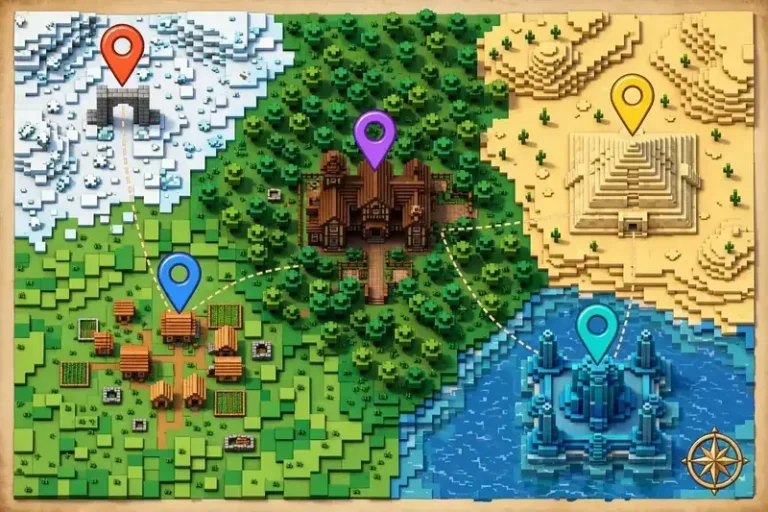
- Find your biome. Look for the biome on the map, or search for it by name. The map shows every biome in the world at once, with coordinates.
- Travel or teleport. Walk, sail, or teleport to the coordinates. For a far-away biome, consider a Nether hub to cut the trip to an eighth of the distance.
Method 1: The Seed Map (Best Overall)
For planning a whole world, finding biomes in Minecraft with a seed map beats every in-game method. You see every biome at once, you get exact coordinates, and you need no cheats – which means Bedrock achievements stay intact. It also answers questions a command cannot: which biome is closest to spawn, whether your seed even has a mushroom island, and where the nearest three villages sit relative to that desert you want. The biome finder is built for exactly this job, and it works for both Java and Bedrock seeds.

Method 2: The Minecraft Biome Finder Command – /locate Biome (Fastest for One Biome)
If you only need one biome, finding biomes in Minecraft with the minecraft biome finder command is the fastest in-game route. The minecraft biome finder command is /locate biome followed by the biome name – players also call it the minecraft biome search command, and it is the same command either way.
- Java (1.19+):
/locate biome minecraft:desert - Bedrock:
/locate biome desert
The same command finds underground biomes too: lush caves is one of the most-searched targets, and /locate biome minecraft:lush_caves points you straight at the nearest one.
The game prints the coordinates of the nearest matching biome. Three details worth knowing: the command only searches your current dimension – stand in the Nether to find Nether biomes – and it searches a limited radius, so for a very rare biome it may answer that it could not find the biome within a reasonable distance. When it does find one, the coordinates printed in chat are clickable: click them to fill in a teleport command. On Java singleplayer, you can dodge the problem by opening the world to LAN with cheats on, running the command, then closing LAN. The command is perfect when you know the exact biome name and just want coordinates – for browsing a whole world, the seed map is still faster.
Method 3: Exploring on Foot, Boat, or Elytra
The oldest method is also the slowest: walk, sail, or fly in one direction and watch the terrain change. It needs no cheats and no seed, and some players genuinely enjoy the discovery. Even so, finding biomes in Minecraft by exploring teaches you the terrain in a way no map can. As a search strategy, though, it is brutal – rare biomes can sit thousands of blocks away, and oceans all look alike from a boat. Use exploration for the joy of it, not for finding a specific biome on a deadline. If you do explore, carry a boat for oceans, a bed to skip nights, and food for the trip.
Method 4: Check the Biome You’re Standing In
How to Check Minecraft Biome (Your Current Biome)
How to check Minecraft biome readings depends on your edition. Wondering how to see biome in Minecraft Java without any command? Press F3 to open the debug screen and read the Biome line – it shows the exact biome at your position, along with your coordinates and the light level. It costs nothing, needs no cheats, and updates as you walk across biome borders. On Bedrock there is no debug screen, so use the seed map to match your coordinates to a biome, or /locate biome to confirm the nearest one.
How to Find a Biome in Minecraft Bedrock
How to find a biome in Minecraft Bedrock is the question console and mobile players ask most, and the answer is nearly the same as Java’s – with two platform quirks. First, there is no F3 debug screen, so checking your current biome means using a seed map or a command. Second, the cheats tradeoff is permanent: enabling cheats disables achievements for that world, so most Bedrock players should reach for the seed map first. If you play on console or mobile and search how to find biome in Minecraft Bedrock, the honest answer is that the seed map is your best friend, with /locate biome as the backup when cheats are already on.
PE is the old name for Pocket Edition – today’s mobile Bedrock – so how to find a biome in Minecraft PE has the same answer: use a seed map, or /locate biome with cheats enabled. Nothing about the method changes between phone, tablet, console, and Windows Bedrock.

Methods Compared
| Method | Speed | Cheats needed | Works on | Best for |
|---|---|---|---|---|
| Seed map | Instant, whole map | No | Java + Bedrock | Planning, rare biomes, no-cheat worlds |
/locate biome | Instant, one biome | Yes | Java + Bedrock | One target, fast |
| F3 debug screen | Instant, current biome only | No | Java only | Checking where you stand |
| Exploring | Slow | No | All editions | Discovery, immersion |
Final Thoughts
Whatever you pick, finding biomes in Minecraft comes down to one choice: see the whole map, or chase one biome. For one biome with cheats on, the minecraft biome finder command wins. For everything else – planning a base, hunting a rare biome, keeping achievements safe – the seed map from Minecraft Seed Finder is the tool that answers the question before you take a single step. If you are still learning the ropes, the guides cover seeds, structures, and every method in more depth.
Whatever method you choose, finding biomes in Minecraft is a solved problem once you know your seed. The best way to find biomes in Minecraft for most players is the seed map: it shows the whole world at once, costs nothing, and never touches your achievements. Console players asking how to find a biome in Minecraft Bedrock get the same answer – map first, command second. Start from the Minecraft Seed Finder homepage, browse the finder pages, or jump straight to the best seeds if you would rather skip the hunt entirely.
That is finding biomes in Minecraft, solved: grab your seed, open the seed map, and stop wandering. Your desert, jungle, or mushroom island is already out there – now you know exactly where it is.