Minecraft Pillager Outpost Finder – Locate Outposts, Captains & Raid Loot
A minecraft pillager outpost finder is the fastest way to stop wandering the plains and start raiding with a plan. Outposts are tall, grey towers that rise above the landscape – but they are rare enough that you can walk for thousands of blocks without seeing one. Paste your seed into the minecraft pillager outpost finder below and every outpost on your map appears with exact coordinates, so you can decide which one to hit first instead of hoping to stumble across one.
Outposts are the illagers’ lookout posts; their headquarters is the woodland mansion. The dedicated mansion finder locates it with the same workflow.
Try These Seeds in the Seed Map
Outposts matter because they are the gateway to raids, ominous banners, crossbows, and some of the best early-game enchanted loot in survival. The catch is that walking into one unprepared usually ends with a pillager crossbow bolt in the chest. This page shows you how to find outposts in any seed, what to expect inside, and how to turn a single tower into a full raid farm route.
What Is a Minecraft Pillager Outpost Finder?
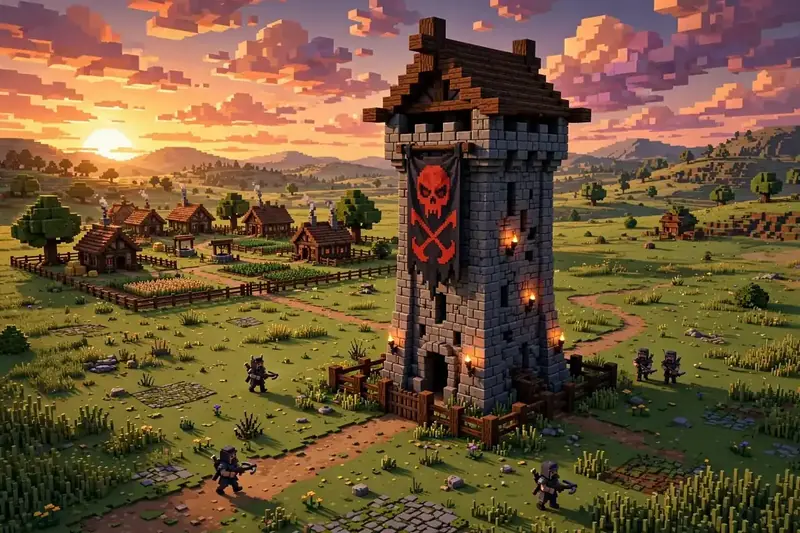
A minecraft pillager outpost finder reads your world seed and calculates where every pillager outpost generates, then plots each tower on a map with its coordinates. A pillager outpost is a generated structure: a tall watchtower of cobblestone and dark oak, ringed by smaller tents and target dummies, patrolled by pillagers and led by a raid captain wearing an ominous banner. Because structure placement is decided by the seed, the same seed always produces the same outposts in the same spots – which means the map is exact, not a guess.
In the minecraft pillager outpost finder, the outpost layer is on by default. Open the seed map, enter your seed, pick your edition and version, and the grey tower markers appear as you explore. Click any marker and the Nearby panel lists its coordinates and distance from your current view. The tool covers Java 1.7–“26.3 and Bedrock Beta 1.7–“26.60 with the real generator for each edition, so the outpost you see on the map is the outpost you will find in-game.
Outposts generate in the same broad set of biomes as villages – plains, desert, savanna, taiga, meadow, snowy slopes, groves, and mountain peaks. That is why checking village biomes on the map is a good way to narrow the search: an outpost is unlikely in a deep forest or ocean, but very plausible on the plains next to a village. Their tall towers are visible from a distance once you are close, so the map marker gets you to the right biome and your eyes do the rest.
How to Use the Minecraft Pillager Outpost Finder
- Paste your seed – Enter your world seed in the seed box on the seed map. If you do not have a world yet, the Minecraft seed finder can search for seeds with an outpost near spawn.
- Match your edition and version – Choose Java or Bedrock and your exact game version. Outpost placement differs between editions, so this step matters.
- Check the outpost layer – The Pillager Outpost layer is on by default. If you have turned layers off, reopen the Layers panel and switch it back on.
- Scan the map – Zoom out and look for the outpost markers in the minecraft pillager outpost finder, or use the Nearby panel to list the closest ones to spawn.
- Search for new seeds – Click Find seeds, then Add condition, choose Structure → Pillager Outpost, and set a radius. Click Search to get up to 100 seeds with an outpost where you want it.
- Copy the coordinates – Click an outpost marker, note the X/Z, and head there in-game – or use
/tpif cheats are on. - Share the view – Use the share menu to Copy link, Save PNG of the map, or export a 4K poster of your raid route.
If you are comparing tools, the chunkbase pillager outpost finder workflow is the same idea – paste a seed, see outposts. The difference here is that you can also search for brand-new seeds with an outpost near spawn, instead of only checking seeds you already have. A chunkbase pillager outpost search and a chunkbase outpost finder search both land on the same need: knowing where the tower is before you walk there.

What You Will Find at an Outpost
An outpost is more than a tower, and the minecraft pillager outpost finder shows you every one of them before you travel. The full structure usually includes:
| Feature | What it means for you |
|---|---|
| Watchtower | The tall tower itself, with a chest at the top holding crossbow and arrow loot |
| Raid captain | A pillager carrying an ominous banner; killing one drops an Ominous Bottle (drink it for Bad Omen) |
| Pillager patrols | Crossbow-wielding pillagers guarding the tower and the surrounding tents |
| Target dummies and tents | Small structures around the base, sometimes with extra chests |
| Caged allays or golems | Allays or iron golems sometimes spawn in cages near the tower – free them for a useful ally |
The tower-top chest is the immediate prize: crossbows, arrows, and enchanted gear. But the bigger prize is the raid captain. In current versions the captain drops an Ominous Bottle instead of applying Bad Omen directly – drink it near a village to start a raid, with waves of pillagers, vindicators, evokers, and a ravager, and totems of undying and emerald loot for survivors. A minecraft pillager outpost finder that shows the captain’s tower before you arrive turns raid prep into a planned trip, not a stumble.
Outposts, Raids, and Nearby Villages
The most valuable outpost is rarely the closest one – it is the one near a village. Raids only trigger in villages, so an outpost sitting a few hundred blocks from a village gives you a repeatable loop: kill the captain, walk to the village, fight the raid, collect totems and emeralds, and repeat. A minecraft seed village and pillager outpost combination is exactly this setup, and a minecraft village seed with pillager outpost near spawn is one of the strongest survival starts in the game.
Use the minecraft pillager outpost finder to check both layers at once. Players comparing a chunkbase pillager outpost finder result with this map will see the same towers; the difference is the seed search, not the markers. The Village layer and the Pillager Outpost layer can stay on together, so you can see the distance between the tower and the nearest village at a glance. If you are hunting for this combo from scratch, stack two conditions in the seed search: Structure → Pillager Outpost within 500 blocks of spawn, plus Structure → Village within 1,000 blocks. The results are seeds where the raid loop is ready from day one.
One warning: do not drink an Ominous Bottle right before entering a village unless you are ready to fight. Bad Omen starts a raid the moment you cross into village range, and an unprepared raid can wipe out the villagers you wanted to trade with. Scout first, gear up, then trigger the raid.

Pillager Outpost Finder for Bedrock
Bedrock players get the same treatment from the minecraft pillager outpost finder, with one difference worth knowing: Bedrock outposts generate through the real Bedrock generator in this tool, not a Java approximation. A minecraft bedrock seed pillager outpost search therefore returns genuine Bedrock coordinates. Paste your Bedrock seed, switch the edition dropdown to Bedrock, and select your version – the outpost markers update to match Bedrock generation.
A chunkbase pillager outpost finder check on Bedrock shows the same idea – paste a Bedrock seed, see Bedrock outposts – but this tool runs the genuine Bedrock generator rather than a Java approximation.
In-game behavior is the same on both editions: pillagers with crossbows, a banner-carrying captain, a tower chest, and raids triggered by Bad Omen in villages. The only practical difference is the seed itself – a seed that puts an outpost at spawn on Java will put it somewhere else entirely on Bedrock, which is why the edition toggle exists.
Chunkbase Pillager Outpost Finder vs This Tool
A chunkbase pillager outpost finder search and this tool answer the same question – where are the outposts in my seed? – with the same basic workflow: paste a seed, see tower markers. The difference is what happens next. A chunkbase pillager outpost finder check stops at the map, while this tool adds a seed search: set a Pillager Outpost condition and find brand-new seeds with an outpost near spawn, or stack a village condition to build a raid loop from day one. If you already have a seed you like, either map gives you the towers; if you want the seed itself to do more work, the search is the reason to stay here.
Outpost Finder vs the /locate Command
In-game, /locate structure minecraft:pillager_outpost points you at the nearest outpost – but only with cheats enabled, one structure at a time, and with no map context. The minecraft pillager outpost finder shows you all of them, how far each one sits from spawn and from the nearest village, and what the terrain between them looks like. For a minecraft seed map pillager outpost check on a world you are already playing without cheats, pasting the seed is the only practical way to see every outpost at once.
For broader scouting, pair the minecraft pillager outpost finder with the Minecraft village finder to plan raid routes, the Minecraft biome finder to check the surrounding terrain, and the best Minecraft seeds collection if you would rather start from a hand-picked world. The full set of tools lives on the finders hub, and the Minecraft seed finder can search for outpost seeds from scratch.
Final Thoughts
The best outpost is the one you reach prepared – with coordinates in hand, a raid plan, and a village close enough to turn one captain into a full raid loop. That is what the map gives you: every tower in the seed, before you walk a single block.
If you came here from a chunkbase pillager outpost finder search, the workflow will feel familiar – paste a seed, see the towers – with the seed search as the extra step that finds new worlds instead of only checking old ones. Open the seed map, pick your version, and try the minecraft pillager outpost finder on your own world first: find your nearest tower, check the nearest village, and plan the raid before you leave base.